DEMO VOYAGE / 01GENOA — BARCELONA
FRANCEITALIAESPAÑAMEDITERRANEAN SEA1GENOA2MONACO3MARSEILLE4BARCELONA
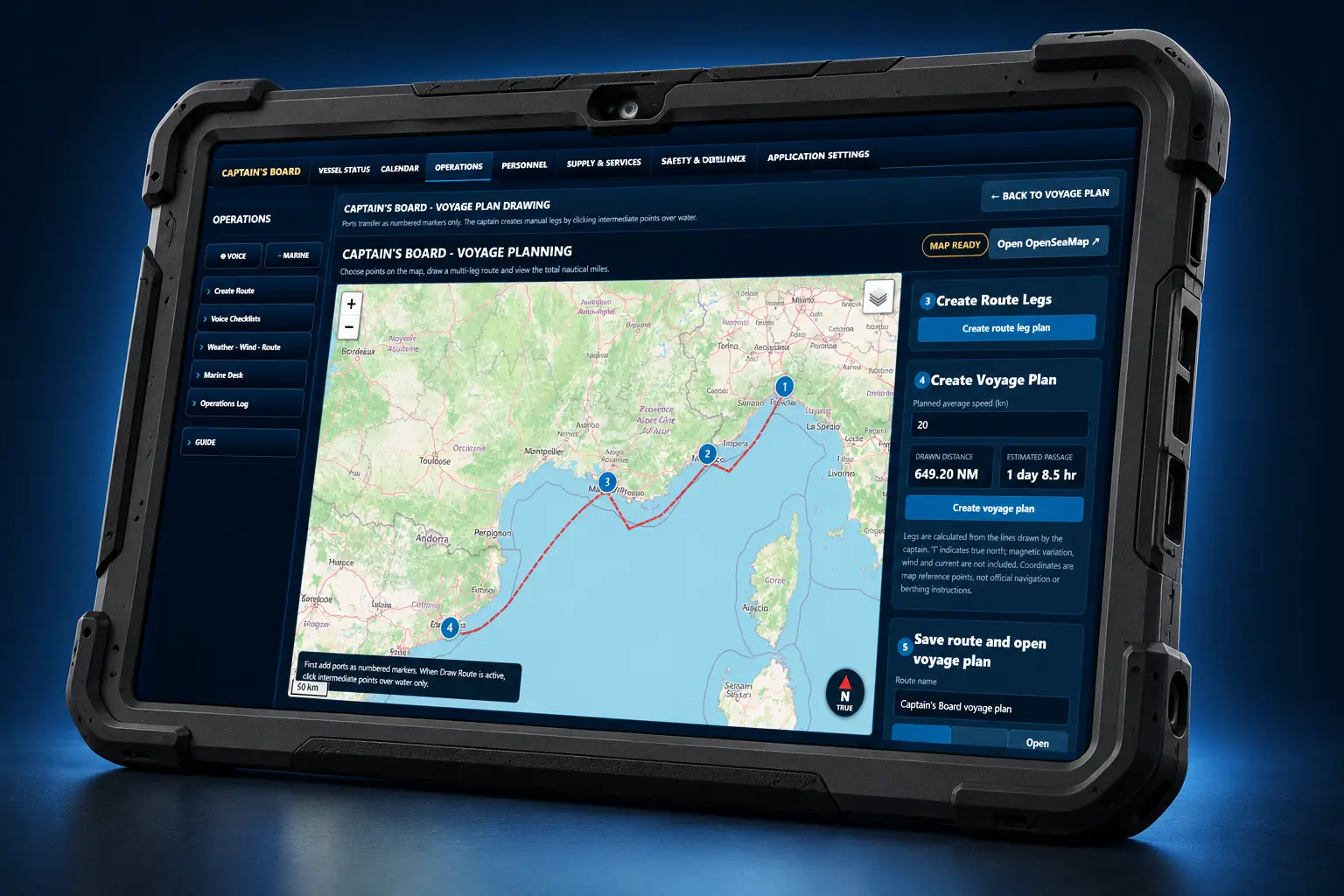
Captain’s Board™ interface inside a rugged tabletExplore with the captain · Click the tablet
358 NM35.8 hours underway · 6 days in portIllustrative voyage line · Not for navigation
THE CAPTAIN’S RIGHT HAND

Good morning, Captain.
I am presenting today’s operational briefing.

Voyage preparation, fuel, water, faults, maintenance, budgets, crew, training, supply, guest management, owner reports and much more. Captain’s Board™ lets you follow all your boat’s operations from one place. Stay focused on the sea and being the captain.

Six languages. One captain’s perspective.English · Türkçe · Français · Español · Italiano · Ελληνικά
19 € / month
Limited-time launch price
9 € / month
Private · Monthly subscription
TRY IT FREE FOR 14 DAYS
Explore all features
THE CAPTAIN’S ESSENTIAL COMPANIONDAILY OPERATIONS IN ONE PLACEPRIVATE / CHARTER
Show the briefing text

Sample demo data · Not a live operational record.

TWO EDITIONS. ONE CAPTAIN’S PERSPECTIVE.

As boats grow, so do their needs.
WhiteCore DSTO™ works for you,
with solutions built around your needs.

From the everyday routine of a private boat to guest hosting and charter operations, choose the scope that fits.

01 / PRIVATE

Private

19 € / month
Limited-time launch price
9 € / month
Monthly subscriptionPrivate boats from 6–14 metres

Your boat. Your plan. A more organised day.

  • Voice morning briefing
  • Voyage and port planning
  • Fuel, water and power
  • Calendar and captain’s notes
  • Maintenance and fault tracking
  • Operations and checklists
  • Safety & compliance: environment–waste, port regulations, inspection readiness
  • Provisioning list and email to the supplier
  • Captain Lock and login password
Explore features
02 / CHARTER

Charter

29 € / month
Limited-time launch price
19 € / month
Monthly subscriptionBoats welcoming charter guests

The Private foundation, plus guests and supply management.

  • Everything in Private
  • Guest management
  • Supply tracking, deliveries and approvals
  • Crew leave and return tracking
  • Financial Affairs · Monthly Budget Centre
  • Season & Refit Centre
  • Communications & Handover Centre
  • Owner report
Explore features
COMPARE EDITIONS

Choose the capabilities you need.

FeaturePrivate
9 € / month
Charter
19 € / month
Briefing, calendar and captain’s notes✓✓
Voyage, ports and operations✓✓
Fuel–water, maintenance and faults✓✓
Safety & compliance: environment–waste, port regulations, inspection readiness✓✓
Captain Lock and login password✓✓
Provisioning list and email to the supplier✓✓
Guest preparation and briefing—✓
Supply tracking, deliveries and approvals—✓
Crew, leave and returns—✓
Financial Affairs · Monthly Budget Centre—✓
Season & Refit Centre—✓
Communications & Handover Centre—✓
Owner report—✓
THE SHARED FOUNDATION

At hand, every day.

Bring scattered notes and separate lists into an operational view built around the captain.

01 / PRIVATE · CHARTER

Voice morning briefing

See calendar events, open faults, fuel and water status and your upcoming voyage in one daily summary. Listen to the briefing.

02 / PRIVATE · CHARTER

Voyage and port planning

Plan port sequence, distance, estimated passage time at your chosen speed and days in port. Identify waste-disposal stops.

03 / PRIVATE · CHARTER

Fuel, water and power

Track delivery records, tank capacity, consumption estimates based on your inputs and critical-level warnings.

04 / PRIVATE · CHARTER

Calendar and captain’s notes

Organise daily work, upcoming dates and reminders. Keep your notes with date and time.

05 / PRIVATE · CHARTER

Maintenance and fault tracking

Record faults, priorities and their effect on departure. See maintenance dates in the calendar and follow open work.

06 / PRIVATE · CHARTER

Operations and checklists

Keep port operations, logs and checklists organised. Access weather, wind and useful maritime links.

07 / CHARTER

Owner report

Send the vessel owner all current data on the topics you choose by email, with one click, whenever you want.

08 / PRIVATE · CHARTER

Safety & compliance

Environment and waste records, port regulations by country and inspection readiness in one place.

09 / CHARTER

Crew leave and return tracking

Track crew leave, return dates and team status. See upcoming returns alongside the calendar and captain’s briefing.

10 / CHARTER

Guest management

Organise visit dates, transfers, welcome preparation and food and drink requirements. Prepare guest briefings and connect provisioning needs with supply.

11 / CHARTER

Season & Refit Centre

Coordinate winterisation, shipyard periods, major refits, maintenance plans, budgets, supply and calendar links from one centre.

12 / CHARTER

Financial Affairs · Monthly Budget Centre

Track the monthly budget, expense items, financial approvals and actual cost summaries in one captain-focused view.

13 / PRIVATE · CHARTER

Captain Lock

Lock the active page with a captain-created password. Hand the tablet to a crew member for QR scanning or another task while preventing navigation to other pages.

WHITECORE DSTO™

From field experience to digital order.

WhiteCore DSTO™ combines technical documentation discipline and operational experience with digital system design. Captain’s Board™ brings that approach to the captain’s daily work: keeping relevant information together, organising preparation and following records.

Useful to know

Who is Captain’s Board™ for?

Designed to support captains. Private is for 6–14 metre private boats; Charter is for yachts welcoming guests and managing guest operations.

Does it need the internet?

Core Captain’s Board™ operations and locally stored records can be used offline. Live weather, external maritime links and email need internet access. WhiteCore Gangway and WhiteCore Crew Check-In also require internet access for web connectivity, communication between devices and sharing notifications.

Can I navigate with Captain’s Board™?

No. It is not connected to GPS. Use Captain’s Board™ for voyage preparation and planning; use your navigation equipment for actual navigation.

How does it track fuel and water?

Enter your data accurately; the program calculates remaining fuel from average consumption. Water is calculated from the daily average.

Is it compliant with personal data protection law?

Yes. The program does not store personal data. Crew records are kept by professional title, not personal data. Personal information should only be retained locally under the captain’s responsibility when the necessary security measures are in place.

Is the daily briefing in the demo a fixed prepared scenario?

No. The daily briefing is generated entirely from the data you enter into the program and presents the results produced by the program’s calculations.

Can I send supply and guest request forms as email attachments?

Yes. The program is designed for this. You can enter the recipient’s email address and send the forms as attachments, but Outlook must be installed on your computer.

What do I need for the briefing voice?

The briefing can be spoken in six languages. On Windows, ensure the required speech languages and voices are installed. On Android tablets, check the voice engine and language under Settings > Text-to-speech output (TTS); you may need to download missing voices in advance. Menu names vary by device, and available voices depend on the system.

CAPTAIN’S BOARD™

Find the edition that fits your boat.

Bring your daily operations together before your next voyage.

Explore all features
CAPTAIN’S BOARD™ / PRIVATE

Everyday order for your boat.

For all private boats from 6–14 metres. A day out or a longer passage: keep your plan, records and vessel status organised.

9 € / month

Monthly subscription

6–14 METREPrivate boat captains

Captain-focused. Built for daily use.

What you can do with Private

01 / PRIVATE

Voice morning briefing

See calendar events, open faults, fuel and water status and your upcoming voyage in one daily summary. Listen to the briefing.

02 / PRIVATE

Voyage and port planning

Plan port sequence, distance, estimated passage time at your chosen speed and days in port. Identify waste-disposal stops.

03 / PRIVATE

Fuel, water and power

Track delivery records, tank capacity, consumption estimates based on your inputs and critical-level warnings.

04 / PRIVATE

Calendar and captain’s notes

Organise daily work, upcoming dates and reminders. Keep your notes with date and time.

05 / PRIVATE

Maintenance and fault tracking

Record faults, priorities and their effect on departure. See maintenance dates in the calendar and follow open work.

06 / PRIVATE

Operations and checklists

Keep port operations, logs and checklists organised. Access weather, wind and useful maritime links.

07 / PRIVATE

Captain Lock and login password

Protect the active page with a captain-defined password when handing the tablet to another person.

08 / PRIVATE

Provisioning list and email to the supplier

Prepare galley, interior and deck provisioning lists and send them to your supplier as a PDF by email.

09 / PRIVATE

Safety & compliance

Environment and waste records, port regulations by country and inspection readiness in one place.

Three steps in everyday use

01

Plan

Choose your ports, stays and daily tasks.

02

Check

Review your briefing, fuel–water and open work.

03

Record

Keep delivery, maintenance and operational notes.

CAPTAIN’S BOARD™

Find the edition that fits your boat.

Bring your daily operations together before your next voyage.

Explore all features
CAPTAIN’S BOARD™ / CHARTER

Be prepared.
Before your guests arrive.

All Private features, plus guest, supply and crew leave management. See arrival preparation, provisioning and deliveries alongside daily operations.

Includes the Private foundation

19 € / month

Monthly subscription

PRIVATE +Guests and supply

Captain-focused. Built for daily use.

What Charter adds

01 / CHARTER

Be ready before guests arrive

Bring visit dates, flight and transfer preparation, welcome tasks and guest briefings together.

02 / CHARTER

Turn preferences into preparation

Prepare food, drink and arrival forms to gather preparation details. Email workflows use Outlook with captain approval.

03 / CHARTER

Provisioning and requirements

List galley, interior and deck requirements; follow missing items, quantities and received supplies.

04 / CHARTER

Supply, cost and approval

Organise suppliers, orders, deliveries and service records. Review costs and requests awaiting captain approval.

05 / CHARTER

Financial Affairs · Monthly Budget Centre

Track the monthly budget, planned expenses, actual spending and financial approvals inside the Charter operation.

06 / CHARTER

Season & Refit Centre

Coordinate winterisation, shipyard and major refit periods with maintenance plans, budgets, supply and calendar links.

07 / CHARTER

Communications & Handover Centre

Plan crew and captain handovers and keep communications, open tasks and notes in one handover package.

Three steps in everyday use

01

Prepare arrivals

Organise visit dates, transfers and welcome preparation.

02

List requirements

List provisioning and services around guest preparation.

03

Follow deliveries

Review missing supplies, costs and approvals.

CAPTAIN’S BOARD™

Find the edition that fits your boat.

Bring your daily operations together before your next voyage.

Explore all features
CAPTAIN’S BOARD™ / DEMO

Explore the capabilities.

Choose a capability on the left. Enlarge a preview card on the right to explore the Captain’s Board™ experience.

Return to home
CAPTAIN’S BOARD™